

- Broker upstream credentials - Agents authenticate once; Golf injects API keys and OAuth tokens for upstream MCP servers
- Enforce strict role-based access - Control which agents can access which servers, tools, and resources
- Continuous governance through logging - Every interaction is logged with tamper-proof audit trails
- Ringfence sensitive data - Automatically redact PII to prevent leakage to model providers and downstream systems
The Problem
Traditional API gateways and WAFs were not built for MCP. They see HTTP and JSON, but they don’t understand:- MCP methods, tools, resources, prompts, elicitation, sampling, and other protocol primitives
- Multi-step agent flows and how tools are actually used
- Authorization decisions that require MCP-aware context (tools, resources, and capabilities)
What Golf Gateway Does
Govern
Single control point regardless of which agent (Claude, Cursor, ChatGPT, Copilot) employees use.
Audit
Full audit trail for every interaction. Export to your SIEM (Elasticsearch, Sentinel, OTLP).
Control
Centralized RBAC for non-human identities. One policy layer across all your agents and MCP servers.
Protect
Redact PII automatically and enforce rate limits and replay protection.
- Without Gateway
- With Gateway
Security
Golf Gateway applies multiple security controls on every MCP request.Rate Limiting
Protect against abuse with sliding-window rate limiting at three layers:
The most restrictive limit applies.
Replay Protection
Prevent session token theft and reuse:- When a session is first used, it’s bound to the authenticated user
- If the same session ID appears with a different user, it’s flagged as replay
- Replay attempts are blocked and logged
Audit & Visibility
Every request is logged with cryptographic integrity:- HMAC-SHA256 hash chain - Tamper-evident logging
- Sequence numbers - Detect missing or reordered entries
- Rich metadata - User, server, tool, latency, authorization result
Policy Engine
The Policy Engine is the centralized governance system that manages and enforces access control and data protection across Golf Gateway. It operates on a 3-layer hierarchy where policies at each level can restrict (but never expand) permissions:How Policies Merge
Policies follow a “most restrictive wins” doctrine. As you move down the hierarchy, policies can only become more restrictive, never less:Example: Three-Layer RBAC Merge
Example: Three-Layer RBAC Merge
Server RBAC
Server RBAC controls which user groups can connect to each MCP server. Configure at any layer to set defaults or restrictions:
When both modes are configured across layers, deny lists are checked first and take precedence.
Capability RBAC
Capability RBAC provides fine-grained access control for individual tools, prompts, and resources. It uses a 4-layer merge that incorporates MCP tool annotations:1
Organization Policy
Set default groups for each annotation category (read-only, destructive, unspecified)
2
Gateway Policy
Override or restrict org defaults (merged via intersection)
3
Annotation Selection
Tool annotations determine which policy category applies
4
Capability Override
Per-tool group restrictions (intersected with policy)
Tool Annotations
Annotations are metadata hints that MCP servers provide about their tools. They’re part of the MCP specification and describe the nature of each tool’s behavior—whether it only reads data, makes destructive changes, or falls somewhere in between. Golf Gateway discovers these annotations automatically when it connects to an MCP server and uses them to apply the appropriate access policy:Example: Annotation-Based Policy
Example: Annotation-Based Policy
You configure these defaults at the organization level:When a user invokes a tool:
list_files(readOnlyHint: true) → Allowed for all usersdelete_file(destructiveHint: true) → Requires admin groupsend_message(no annotations) → Requires developers or admins
PII Scrubbing Policy
PII scrubbing configuration follows the same 3-layer merge. At each layer you can configure:- Sensitive fields: Field names to always mask
- Pre-built recognizers: Toggle built-in entity detection (21 types)
- Custom rules: Regex patterns with mask/remove/hash/replace methods
- Custom entities: AI-powered detection for custom data types
Capability Versioning
Unlike RBAC and scrubbing policies, versioning is configured per-server only and is not part of the 3-layer policy hierarchy.
- Gateway discovers new/changed capabilities during refresh
- Changes are marked as “pending approval”
- Capabilities are blocked until an admin approves them
- All changes are recorded in the capability history for audit
Authentication
Golf Gateway implements a proxy authentication model: users authenticate to the gateway once, and the gateway manages credentials for upstream MCP servers.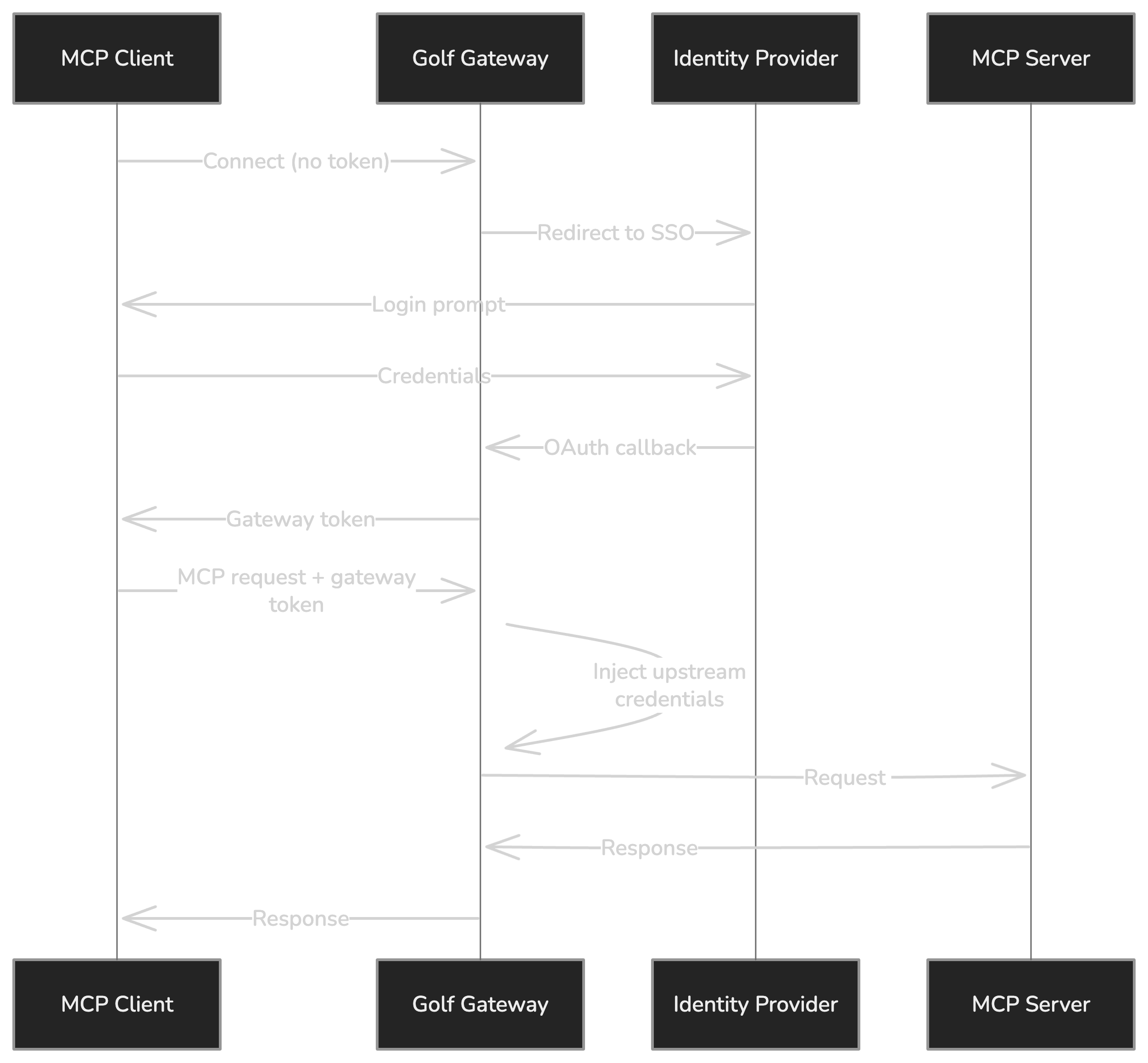
- User authenticates to Gateway via your identity provider (Auth0, Entra ID, Descope)
- Gateway issues a session token (HS256 JWT) for subsequent requests
- Gateway injects upstream credentials for each MCP server the user accesses
- Users never see upstream credentials - they’re managed entirely by the gateway
- API Keys
- OAuth Tokens
For MCP servers that accept static API keys:
- User provides their API key once in the Dev Portal
- Key is encrypted and stored securely
- Gateway injects the key into requests automatically
Configuration Modes
Golf Gateway supports two primary configuration modes that determine where configuration and policies are loaded from:- Centralized Mode
- Distributed Mode
All configuration from Control Plane
- MCP servers, policies, and exporters defined in Control Plane UI
- Gateway fetches configuration bundles on startup and heartbeat
- Hot reload on configuration changes (no restart needed)
These modes are not mutually exclusive. You can run some gateways in centralized mode and others in distributed mode within the same organization. All gateways share organization-wide policies from the Control Plane.
- YAML file with
control_planesection → Distributed mode - Control Plane environment variables only (no YAML) → Centralized mode
When to Deploy Multiple Gateways
Just as organizations deploy multiple API gateways for different domains and audiences, Golf Gateway supports multi-gateway architectures. Each gateway can serve a specific purpose while reporting to the same Control Plane for unified visibility.- Per-Domain
- Per-Audience
- Per-Environment
Separate gateways for different business domainsEach team or department gets its own gateway with tailored policies:
- Engineering Gateway - Company-built agents accessing internal APIs
- HR Gateway - Employee-facing agents with strict PII controls
- Finance Gateway - Agents accessing financial systems with enhanced audit requirements
Benefits
Start with a single gateway and add more as your requirements grow. The Control Plane makes it easy to manage any number of gateways from one place.
Deployment
Golf Gateway is available as a Docker image for Kubernetes and container deployments.Image
Hardware Requirements
Recommended:- 4 vCPU
- 8 GB RAM
c7a.xlarge
Required Dependencies
Golf Gateway requires the following external services:Redis is essential for Golf Gateway operation.