

- Which AI tools are connected to our GitHub?
- Who approved those connections?
- What data flowed through them last month?
- Is PII being sent to model providers?
The Governance Gap
Whether you’ve blocked AI tools entirely or approved them across teams, you’re facing the same problem:- Blocked Everything
- Approved AI Tools
Security said no. Too much risk, no visibility, no way to control what connects to what.The problem: Your employees are using these tools anyway—on personal devices, personal accounts, outside your network. You don’t see it, you can’t audit it, and you have zero control over what data flows through. The block didn’t reduce risk—it just eliminated your visibility.Meanwhile, your competitors are shipping faster.
What’s At Risk
These aren’t theoretical risks. They’re patterns we see repeatedly across enterprises adopting AI tools.Shadow Integrations
Shadow Integrations
Without clear policies, employees connect whatever they find. Someone configures their AI tool to connect to Salesforce. They set it up. It works. They tell their team.Now six people are using an integration that security has never reviewed, IT doesn’t know exists, and nobody is monitoring. This is shadow IT, but faster—an employee can connect an AI tool to sensitive systems in five minutes. No ticket, no approval, no audit trail.How Golf helps: All connections route through the gateway. You see every integration, every user, every request.
Unvetted Integrations
Unvetted Integrations
An engineer wants to connect their coding assistant to a tool. They find a third-party integration—maybe it has a few hundred stars on GitHub. They download it and run it locally.No security review. No code audit. No verification this is an official integration. And because it’s running locally, there’s no authentication layer, no access controls, no audit logs. Whoever runs it gets full access to whatever it connects to.How Golf helps: Classify and approve integrations. Only approved integrations route through your gateway.
Supply Chain Risks
Supply Chain Risks
You approve an integration today. It looks fine.Next week, the maintainer pushes an update. New capabilities added. Behavior changed. Maybe intentionally malicious, maybe just careless. Your AI tools are now running different code than what you reviewed.There’s no versioning enforcement. No change detection. No alert when an integration you depend on modifies its capabilities.How Golf helps: Capability versioning detects when integrations change. New capabilities require re-approval.
PII Leakage
PII Leakage
When someone asks Cursor to “summarize this customer file,” that data goes to model providers. No inspection, no DLP.If that file contains social security numbers, credit card data, or health records—it’s now sitting on a third-party server. For fintechs, healthcare companies, and any regulated industry, this can be a compliance violation.How Golf helps: PII scrubbing detects and masks sensitive data before it reaches model providers.
No Audit Trail
No Audit Trail
When an incident happens, you need to answer: What data was accessed? Which systems were queried? Who initiated the request? What was returned?With fragmented AI tool integrations, you can’t answer any of this. There are no logs. There’s no central record of what data flowed through which tool to which system.When auditors ask how you govern AI access to sensitive systems, “we don’t track that” is not an acceptable answer.How Golf helps: Every request logged with cryptographic integrity. Who, what, when, where—all searchable. SIEM-ready (Splunk, Datadog, Sentinel).
Prompt Injection
Prompt Injection
AI tools read content from your systems and have access to sensitive data. Attackers can craft malicious content—in GitHub issues, Slack messages, or documents—that hijacks the AI tool when it reads that content, causing it to leak data or take unauthorized actions.In May 2025, security researchers demonstrated this exact attack against popular AI tool integrations with GitHub.How Golf helps: AI-powered prompt injection detection analyzes every message in real-time.
What is Golf?
Golf is the single governance layer for all AI tool integrations. It deploys in your environment and sits between your AI tools and your systems—one control point for authentication, permissions, data inspection, and audit logging, regardless of which AI tool an employee uses.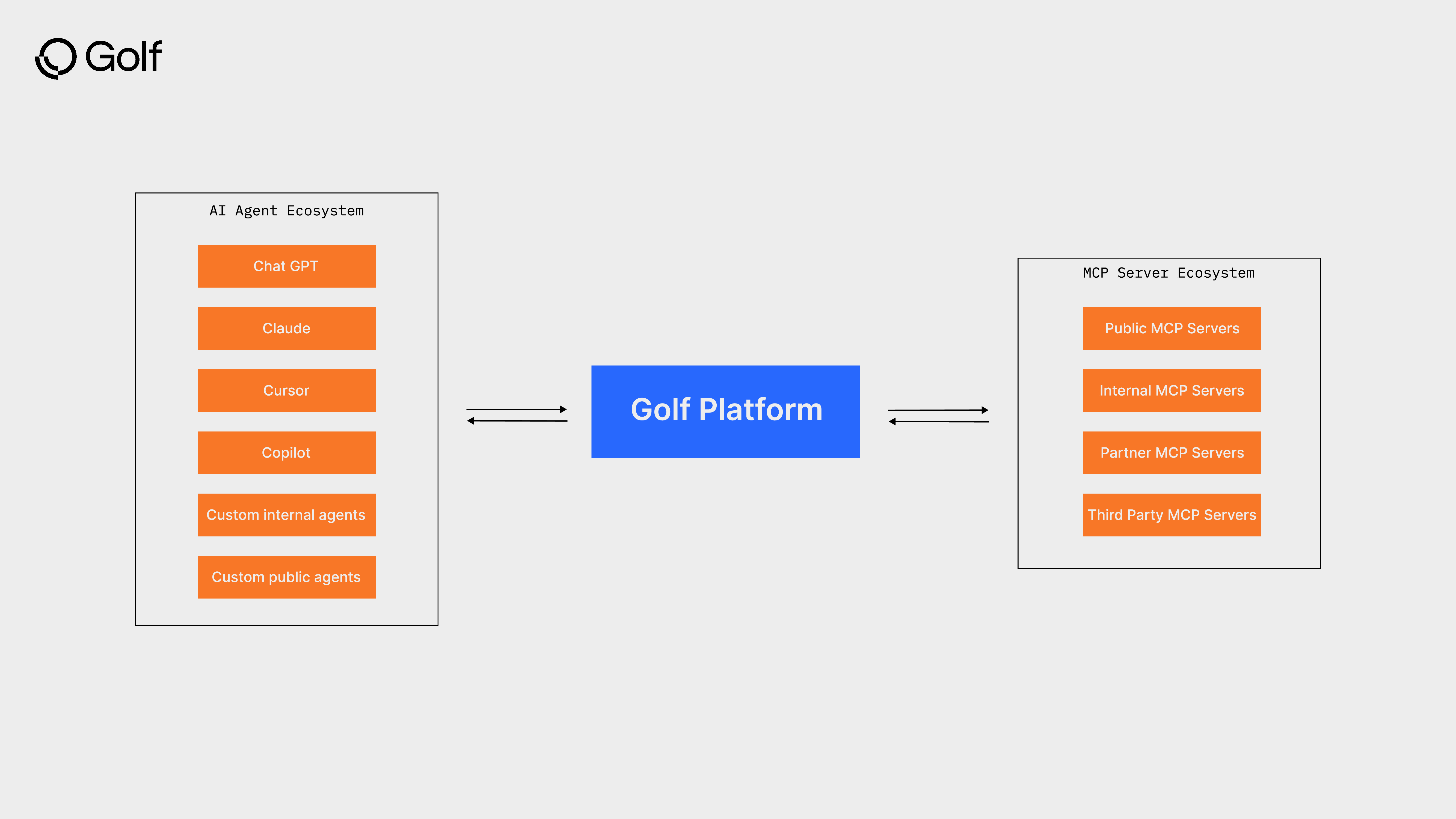
Centralized Inventory
See every AI tool and every integration across your org
Access Control
Role-based permissions via your existing IAM. Least privilege by default.
Data Protection
Detect and redact PII before it reaches model providers
Complete Audit Trail
Every request logged. SIEM-ready (Splunk, Datadog, Sentinel).
System Architecture
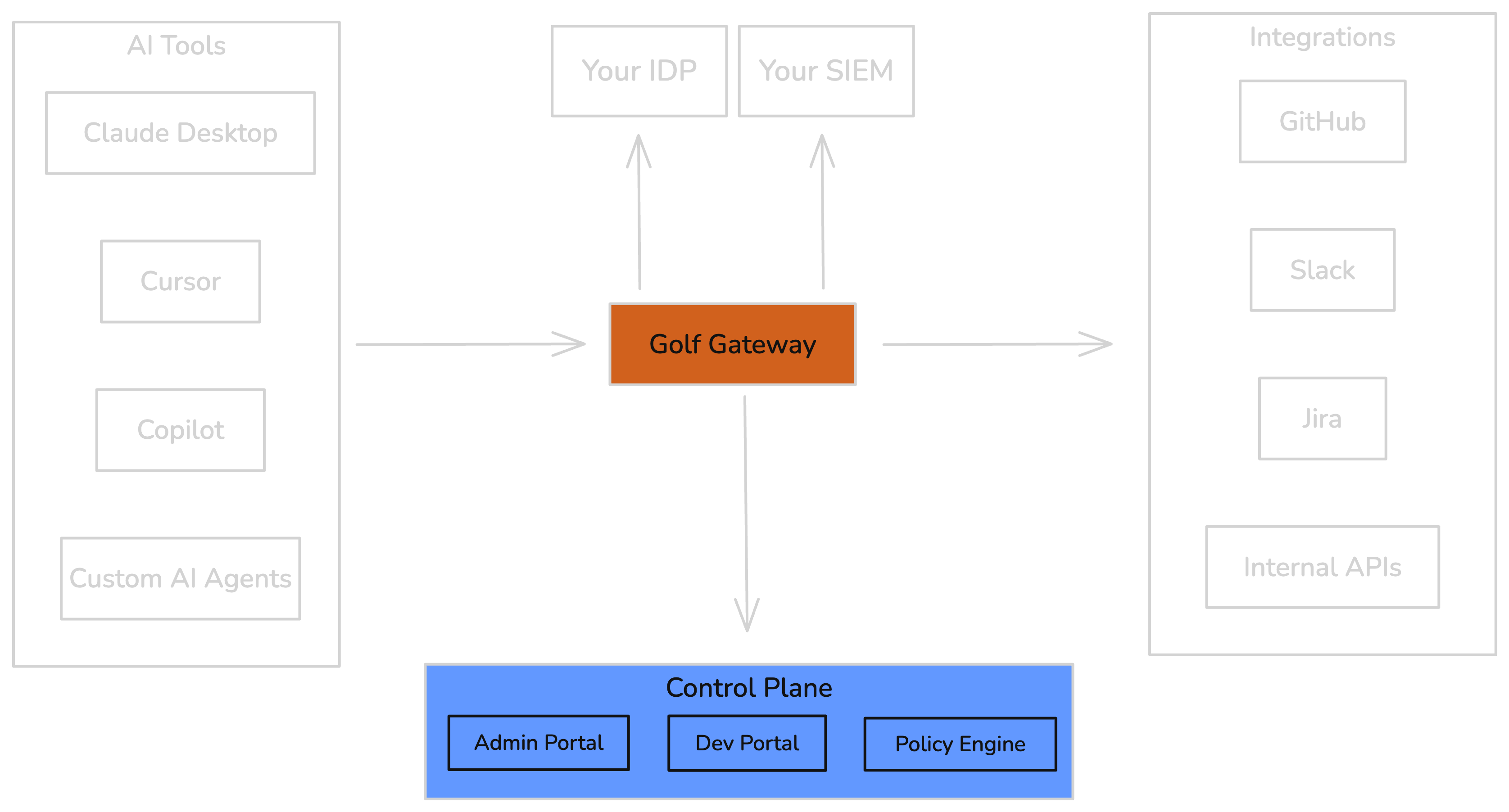
Golf provides centralized governance for AI tools connecting to enterprise systems. The architecture has three main layers:Platform Overview
Component Responsibilities
| Component | Location | Responsibilities |
|---|---|---|
| Control Plane | Golf Cloud or Self-Hosted | Policy management, integration registration, monitoring, Dev Portal |
| Gateway Runtime | Your Infrastructure | Security pipeline, audit logging, credential injection |
| Identity Provider | Your IdP | User authentication, SSO, group membership |
| AI Tools | Developer Workstations | Claude Desktop, Cursor, Copilot, ChatGPT |
| Integrations | Your Network or SaaS | GitHub, Slack, Jira, internal tools |
Deployment Options
- Golf Cloud
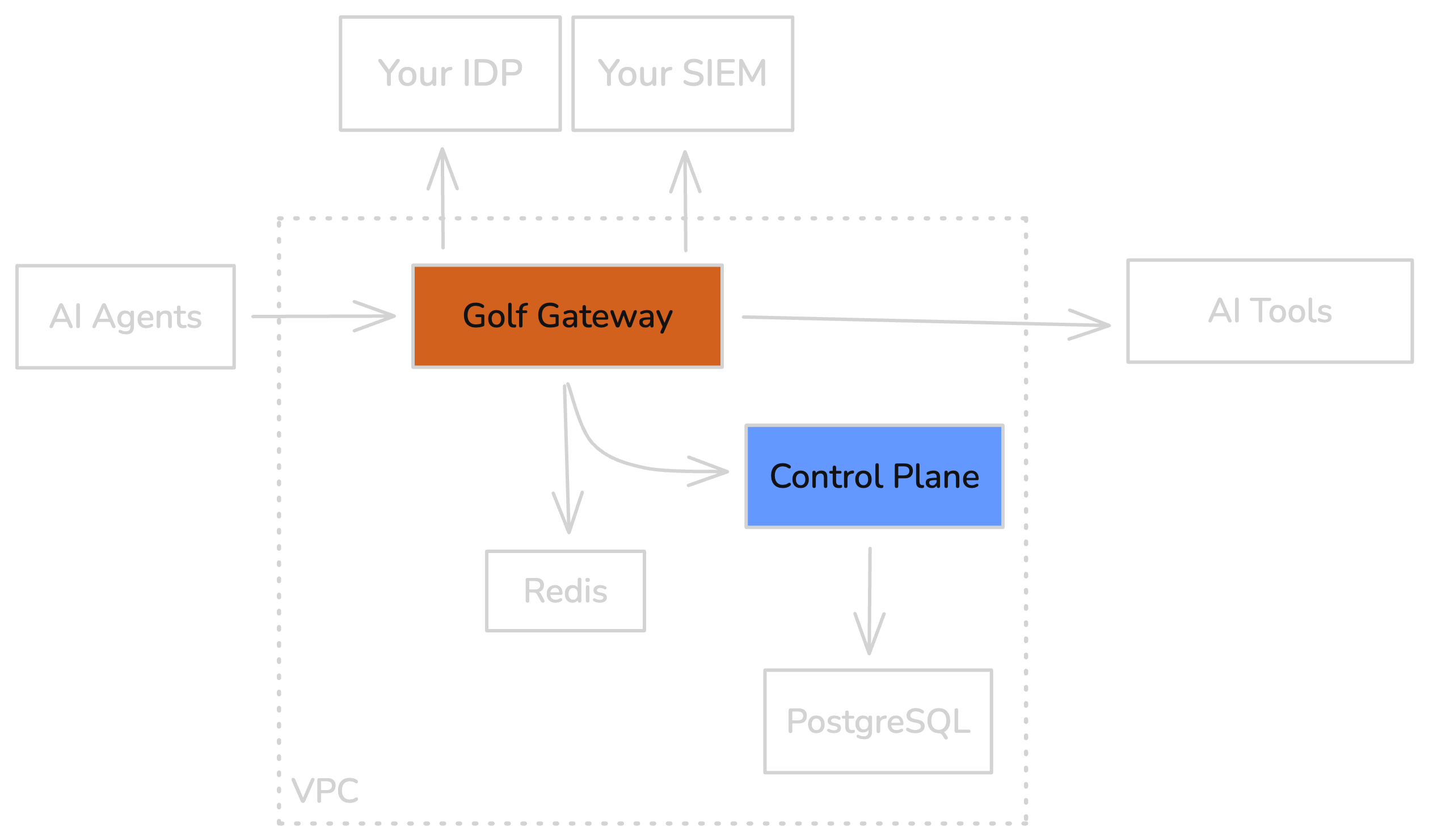
- Self-Hosted
Control Plane hosted by Golf. Zero infrastructure management. Live in under a week.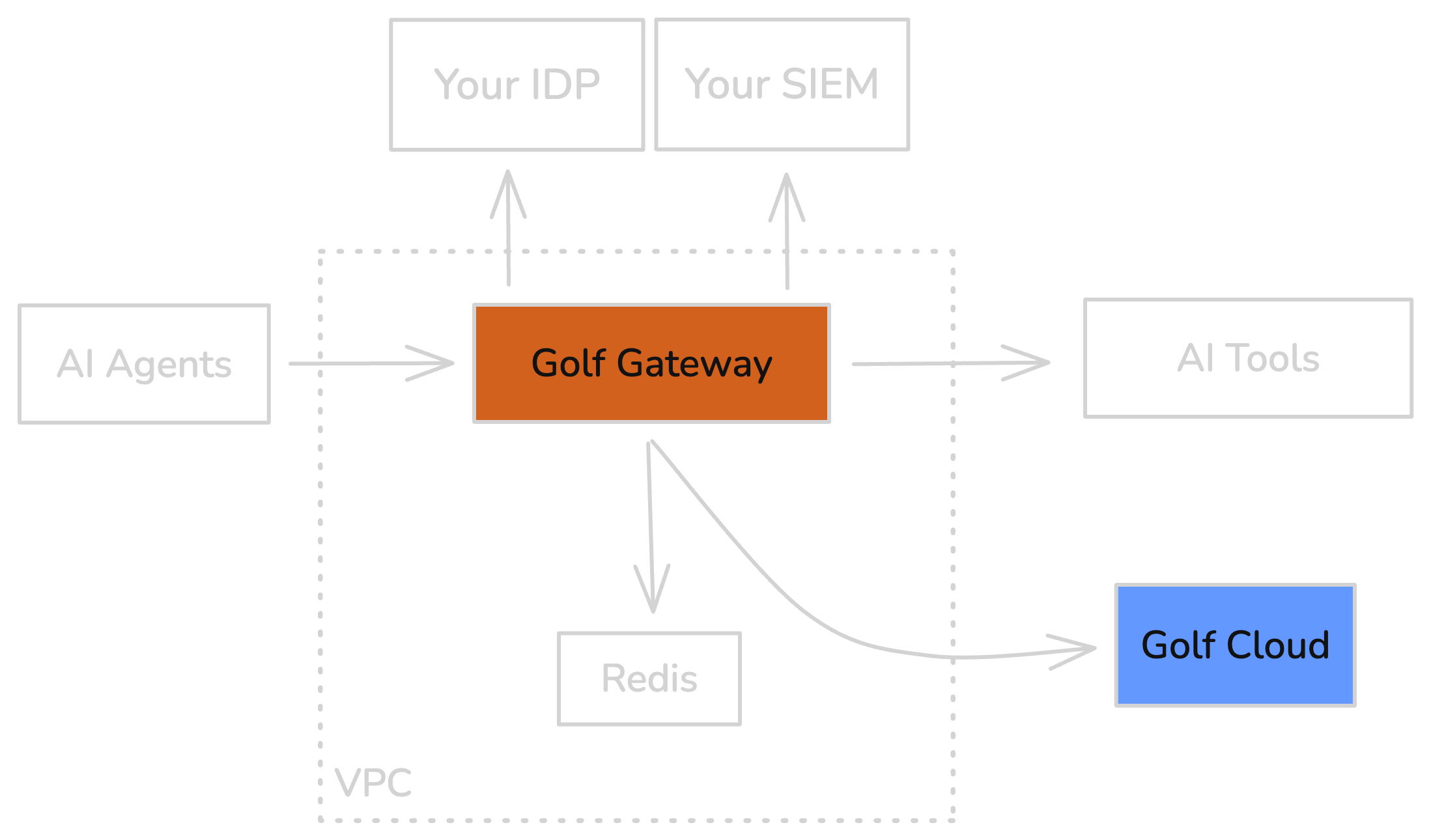
- Gateway connects to
api.golf.dev - Configuration managed via Admin Portal
- Audit logs exportable to your SIEM
- Your data never leaves your infrastructure
I Am A…
Find your starting point based on your role.- New User
- Developer
- Security Admin
- Platform Engineer
Goal: Understand what Golf is and try it out
Next Steps
Understand the Product
Deploy Your First Gateway
Solve a Problem